The concept in one sentence
You’re building a private, encrypted “network bridge” between your Azure Virtual Desktop (AVD) virtual network and your on-premises network, so AVD resources (session hosts, domain join, file shares, line-of-business apps) can talk to on-prem systems as if they’re on the same internal network, without exposing those systems to the public internet.
Why Azure VNets matter (first principles)
An Azure Virtual Network (VNet) is your private network inside Azure.
- Outbound internet from resources in a VNet is typically allowed by default (unless you restrict it).
- Inbound from the internet is not allowed unless you explicitly expose something:
- Assign a Public IP to a VM (not recommended for most enterprise workloads)
- Put a Public Load Balancer / Application Gateway in front
- Use other controlled entry points (VPN, Bastion, etc.)
So by default, Azure is “private inside, controlled at the edges.”
The three ways to connect Azure to on-prem (what they really mean)
1) ExpressRoute (private circuit)
- Think: Dedicated leased line from your datacenter to Microsoft.
- Traffic does not traverse the public internet.
- Highest reliability and consistent performance.
- Usually used by larger orgs with strict requirements.
2) Point-to-Site (P2S) VPN (user device → Azure)
- Think: An employee laptop connects directly to Azure using a VPN client.
- Great for:
- Admin access to Azure private networks
- Remote users needing private access to Azure resources
- Not ideal when you need site-wide routing between networks.
3) Site-to-Site (S2S) VPN (on-prem network ↔ Azure VNet)
- Think: Your firewall/router at HQ creates a VPN tunnel to Azure VPN Gateway.
- Once up:
- Any device in your on-prem subnet can reach Azure subnets (based on routing rules)
- Azure workloads can reach on-prem resources the same way
- Common for AVD hybrid scenarios:
- Session hosts must domain join
- FSLogix needs file shares or Azure Files with AD auth
- Apps need on-prem databases or APIs
What gets created in Azure for a Site-to-Site VPN (the “3 objects”)
A working S2S VPN in Azure typically involves:
A) Virtual Network Gateway (VNG)
This is the Azure-side VPN appliance (managed by Microsoft).
- Lives in a special subnet called GatewaySubnet
- Has a Public IP (so your on-prem firewall can reach it)
- Uses IPsec/IKE (IKEv2 commonly)
Key idea: Azure needs a VPN endpoint. The Virtual Network Gateway is that endpoint.
B) Local Network Gateway (LNG)
This is just a definition object that represents your on-prem site.
You tell Azure:
- Your on-prem firewall’s public IP
- Your on-prem internal address spaces (subnets) you want reachable (routes)
Key idea: Azure needs to know “what’s on the other side” and “what networks live there.”
C) Connection
This links the two gateways together:
- Azure VNG ↔ Local Network Gateway
- Uses a pre-shared key (PSK) or certificates (PSK is common for labs)
- Negotiates IPsec/IKE settings
Key idea: This is where the tunnel actually forms.
The traffic flow (visualize it)
When a session host in Azure wants to talk to a domain controller on-prem:
- Session host sends traffic to 10.x.x.x (on-prem subnet)
- Azure routing sees that subnet is reachable via the VPN Gateway
- Traffic goes into the IPsec encrypted tunnel
- On-prem firewall decrypts it and routes internally to the domain controller
Same concept in reverse when on-prem needs to reach Azure.
What “GatewaySubnet /27” really means
Azure VPN Gateway must sit in a dedicated subnet named exactly:
- GatewaySubnet
The /27 is the subnet size (number of IPs reserved). VPN Gateways need space for scaling and features.
Practical take: Don’t squeeze GatewaySubnet too small. /27 is a common safe choice in labs and many real environments.
Why Route-based VPN (vs Policy-based)
- Route-based is the modern standard.
- Works with dynamic routing scenarios and more advanced configurations.
- Policy-based exists mainly for older legacy hardware.
Practical take: If you’re building new, choose Route-based unless a vendor forces policy-based.
The role of the Shared Key (PSK)
A PSK is like a password for the tunnel.
- You configure it on:
- Azure Connection object
- On-prem firewall VPN configuration
If they don’t match, tunnel won’t come up.
What you can and cannot do with this setup
Once S2S is working, you can:
- Domain join AVD session hosts to on-prem AD DS (if routing + DNS are correct)
- Access on-prem file shares, app servers, databases
- Use centralized identity and services without exposing them publicly
It does not automatically:
- Configure your on-prem firewall for Azure (you still must do vendor setup)
- Configure DNS resolution (this is a huge gotcha)
- Open ports (NSGs/firewall rules still apply)
The #1 confusion point: “Connected” does not mean “working apps”
Most “it’s connected but doesn’t work” issues come from:
1) DNS
Your Azure VMs must resolve:
corp.contoso.comdomain controllers- file servers and internal hostnames
If your VNet DNS is still set to Azure default, your VM won’t find on-prem names.
Fix pattern:
- Set VNet DNS to your on-prem DNS servers (or AD DS DNS in Azure)
- Restart VMs or
ipconfig /flushdns
2) Routing overlap
If Azure VNet uses 10.0.0.0/16 and on-prem also uses 10.0.0.0/16, you get conflicts.
Fix pattern:
- Ensure address spaces do not overlap (plan IP ranges early)
3) Ports blocked
Even with VPN up, traffic can be blocked by:
- Azure NSG
- Windows Firewall
- On-prem firewall rules
Tie it back to Azure Virtual Desktop (why you care)
You usually need this connectivity when AVD depends on on-prem services, such as:
- Active Directory domain join for session hosts
- FSLogix profile storage on a file share (or Azure Files with AD auth)
- Legacy LOB apps hosted on-prem
- Print services, licensing servers, internal APIs
If you’re cloud-only (Entra ID join + cloud apps), you might not need S2S at all.
A simple mental model you can reuse
- Virtual Network Gateway = Azure VPN box
- Local Network Gateway = “Azure’s contact card” for your on-prem network
- Connection = the tunnel configuration and shared secret
- GatewaySubnet = the parking lot where Azure places the VPN appliance
- S2S VPN = encrypted bridge between two private networks
I’ll create a comprehensive diagram showing the Site-to-Site VPN concept for Azure Virtual Desktop. Let me build this step by step.
I’ve created a comprehensive Site-to-Site VPN architecture diagram for Azure Virtual Desktop. Here’s what the diagram illustrates:
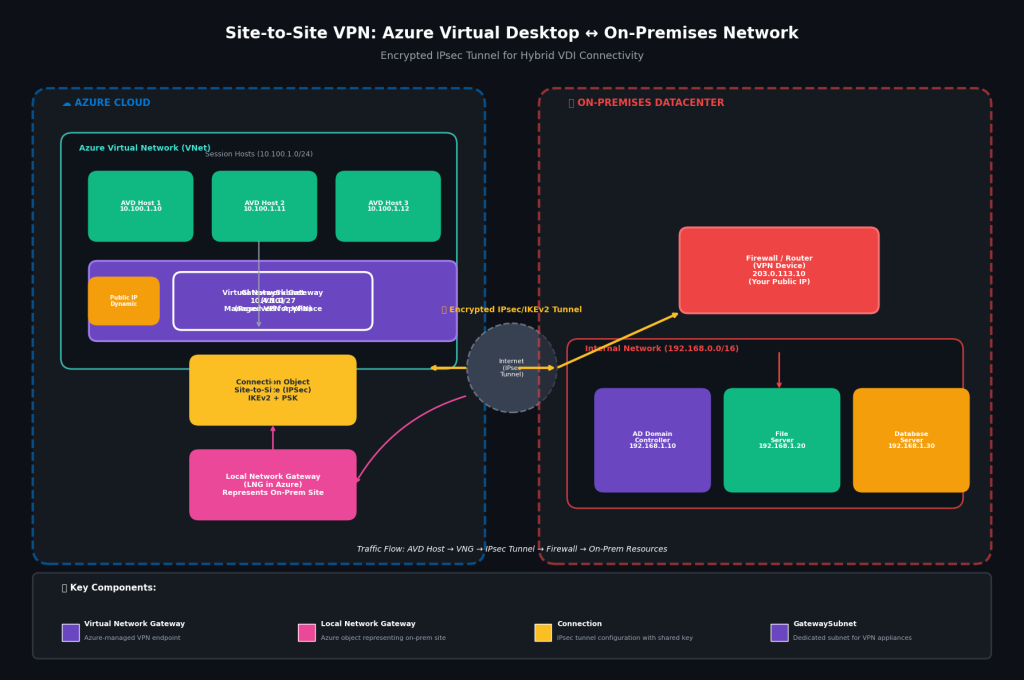
Diagram Components Explained
Left Side: Azure Cloud
| Component | Color | Purpose |
|---|---|---|
| AVD Session Hosts | Green | Virtual desktops (10.100.1.0/24) |
| Virtual Network Gateway (VNG) | Purple | Azure-managed VPN appliance |
| GatewaySubnet | Purple outline | Dedicated subnet (10.4.1.0/27) |
| Public IP | Orange | Dynamic IP for tunnel endpoint |
| Connection Object | Yellow | IPsec/IKEv2 configuration with PSK |
| Local Network Gateway | Pink | Azure object representing on-prem site |
Center: The Internet
- Encrypted IPsec/IKEv2 Tunnel (yellow arrows)
- Traffic flows through public internet but remains encrypted
Right Side: On-Premises Datacenter
| Component | Color | Purpose |
|---|---|---|
| Firewall/Router | Red | Your VPN device (public IP: 203.0.113.10) |
| AD Domain Controller | Purple | Identity services (192.168.1.10) |
| File Server | Green | FSLogix profiles, shares (192.168.1.20) |
| Database Server | Orange | Line-of-business apps (192.168.1.30) |
Traffic Flow Shown
AVD Host (10.100.1.10)
    ↓
Virtual Network Gateway
    ↓
IPsec Tunnel (encrypted)
    ↓
Firewall/Router (203.0.113.10)
    ↓
On-Prem Resources (192.168.x.x)
Key Relationships Visualized
- VNG lives in GatewaySubnet — dedicated space, special subnet name
- LNG represents on-prem in Azure — tells Azure what routes exist across the tunnel
- Connection links VNG to LNG — the actual tunnel configuration
- Firewall mirrors the connection — must match PSK and IKE settings
Use Cases This Enables
| AVD Need | On-Prem Resource | Via This Tunnel |
|---|---|---|
| Domain Join | AD Domain Controller | LDAP/Kerberos |
| User Profiles | File Server | SMB 3.0 |
| Legacy Apps | Database Server | SQL/TCP |
| Group Policy | AD DS | RPC/SMB |


